The whole idea.
One canvas.

Dream it, board it, cut it, deliver it. All of preproduction in one program: an infinite canvas, real storyboards, Photoshop-style frame editing, a Cut page for animatics, a full Edit page, and delivery in every format. Do any of it by hand, or let Cove, the AI in everything, do it with you.

7-day free trial with $1.50 of generations included · works on Mac and Windows · cancel anytime
170+ models. One prompt bar. New ones the week they drop.
Bytedance Seedream V4 EditFLUX.2 [klein] 9BFLUX 2 TurboFabric 1.0GPT-Image 1.5FLUX.1 [pro] FillKling Video v2.6 Image to VideoKrea 2 TurboFLUX.1 [dev] with LoRAsKling Video v2.6 Text to VideoWan 2.5 Image to VideoWanKling O3 Image to Video [Pro]Upscale ImagesFlux 2 MaxFLUX.2 [klein] 9B · EditBytedance Seedream V4 Text To Image
Sync Lipsync 2.0FLUX 2 Pro EditFlux 2 FlexKling LipSync Audio-to-VideoGrok Imagine Image Pro · EditGrok Imagine Image · EditKling v2.5 Text to VideoGrok Imagine Video 1.5Bytedance Dreamactor V2PixVerse V6 Image To VideoSubtitlesKling 2.1 (standard)FLUX1.1 [pro] ultraBytedance Omnihuman V1.5Wan Text to VideoAuraSRSeedance 2.0 Fast Text to Video
Recraft Crisp UpscaleWan 2.5 Text to VideoLtx 2.3 QualityZ Image TurboSeedance 1.0 ProBytedance Upscaler Upscale VideoKling O3 Edit Video [Pro]Topaz Video Upscalesync.so -- lipsync 1.9.0-betaWan-2.2 Animate ReplaceGrok Imagine Extend VideoFLUX1.1 [pro]Recraft V4Kling O1 Edit Video [Pro]FLUX 2 FlashGrok Imagine Video · Edit
Veo3.1 Lite Image to VideoKling O3 Text to Video [Pro]FLUX 2 EditRemove BackgroundBria RMBG 2.0Nano Banana · EditWan-2.2 Text-to-Video A14BPuLID FluxKling 2.1 MasterSync LipsyncBytedance Seedream V4.5 EditGPT-Image 1.5 · EditSeedVR2Seedance 2.0 Mini · Ref→VideoGemini 2.5 Flash Image · EditQwen Image
Ideogram Remove BackgroundVeo 3LTX Video 2.3 Prosync-3 LipsyncGemini 2.5 Flash ImageSeedance 2.0 Fast Image to VideoKling VideoBirefnet Background Removal V2Clarity UpscalerVeo3.1 Lite Text to VideoBirefnet Background RemovalKrea 2 LargeWan · EditPixVerse LipsyncRecraft V3Kling O3 Text to Video [Standard]
LTX 2.3 Video FastKling O3 Edit Video [Standard]Grok Imagine ImagePixVerse V6 Text To VideoIdeogram Text to ImageLTX Video (preview)Segment Anything Model 3Bytedance Seedream V5 Lite EditTopazGrok Imagine VideoVideo Background RemovalSora 2gpt-image-1FLUX.1 Kontext [max]Seedance 2.0 Mini Text to VideoLatentSync
FLUX.1 Kontext [pro]LipsyncFlux 2 Max · EditVeo 3.1MMAudio V2Stable Diffusion XLKling 2.1 (pro)FLUX.1 [dev]FLUX.1 [schnell]Veo 3 FastFLUX 2Nano BananaKling 1.6Ideogram V4.0 Text to ImageFlux 2 ProKling 2.0 Master

From first scribble to first cut.

Most AI tools stop the moment something is generated. Coveboard carries the whole job: gather references, board the shots, draw on the frames, time the cut, edit it, and deliver it. Nobody else closes that loop.

✦ generating…

1One open canvas

Collect references, brainstorm, and build the idea together on an infinite board. Sketches, stills, clips, and sound all live side by side.

Cove
Plan 4 takes of the hero shot
On it. Nano Banana 2, about $0.32 total✦ Run the batch

2AI in everything

Cove generates images, video, and audio, remixes what is already on the board, writes the prompts, picks the model, and quotes the cost before you spend.

MSyou
Push in later here?
Maya Sam

3Make it together

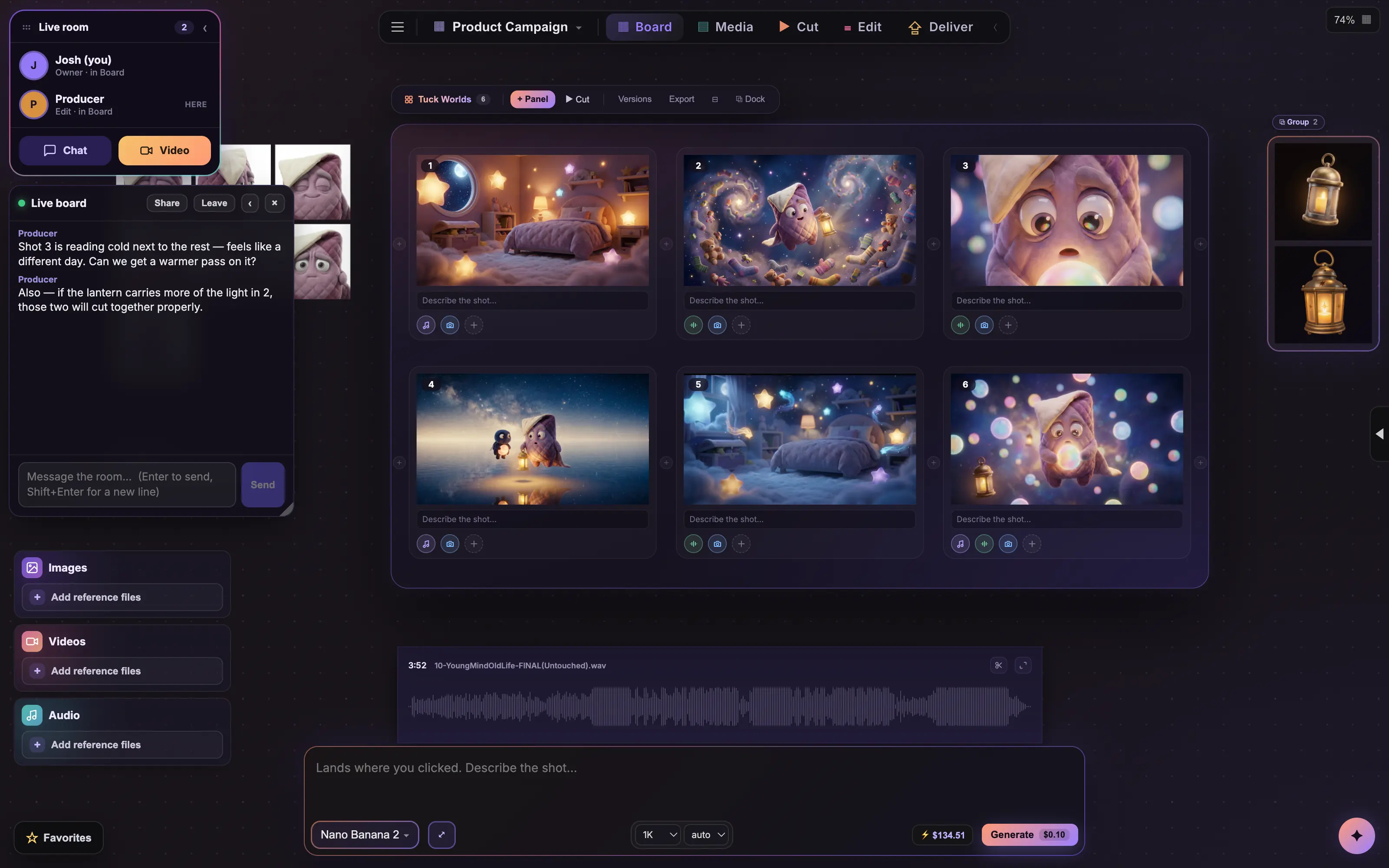
Send one link. Viewers look for free, as many as you want. Editors work right beside you, live: generating, cutting, arranging, scripting, and leaving notes on the same boards, cursors and all.

Nano Banana 2T2I$0.04
Seedance 2.0I2V$0.24/s
GPT Image 2I2I$0.06
Topaz UpscaleV2V$0.01/s
Veo 3.1T2V$0.40/s
Kling 3.0 ProI2V$0.11/s
✦ Ask Cove which model to use

4Hundreds of models

One browser organizes them by what they do, with live prices and human-preference rankings. Ask Cove and it picks the right one for the job.

1
2
3
4
5
6

5Real storyboards

Numbered panels with captions and VO, camera, and SFX notes. Generate straight into a panel or drop in your own shots.

5

6Focus edit

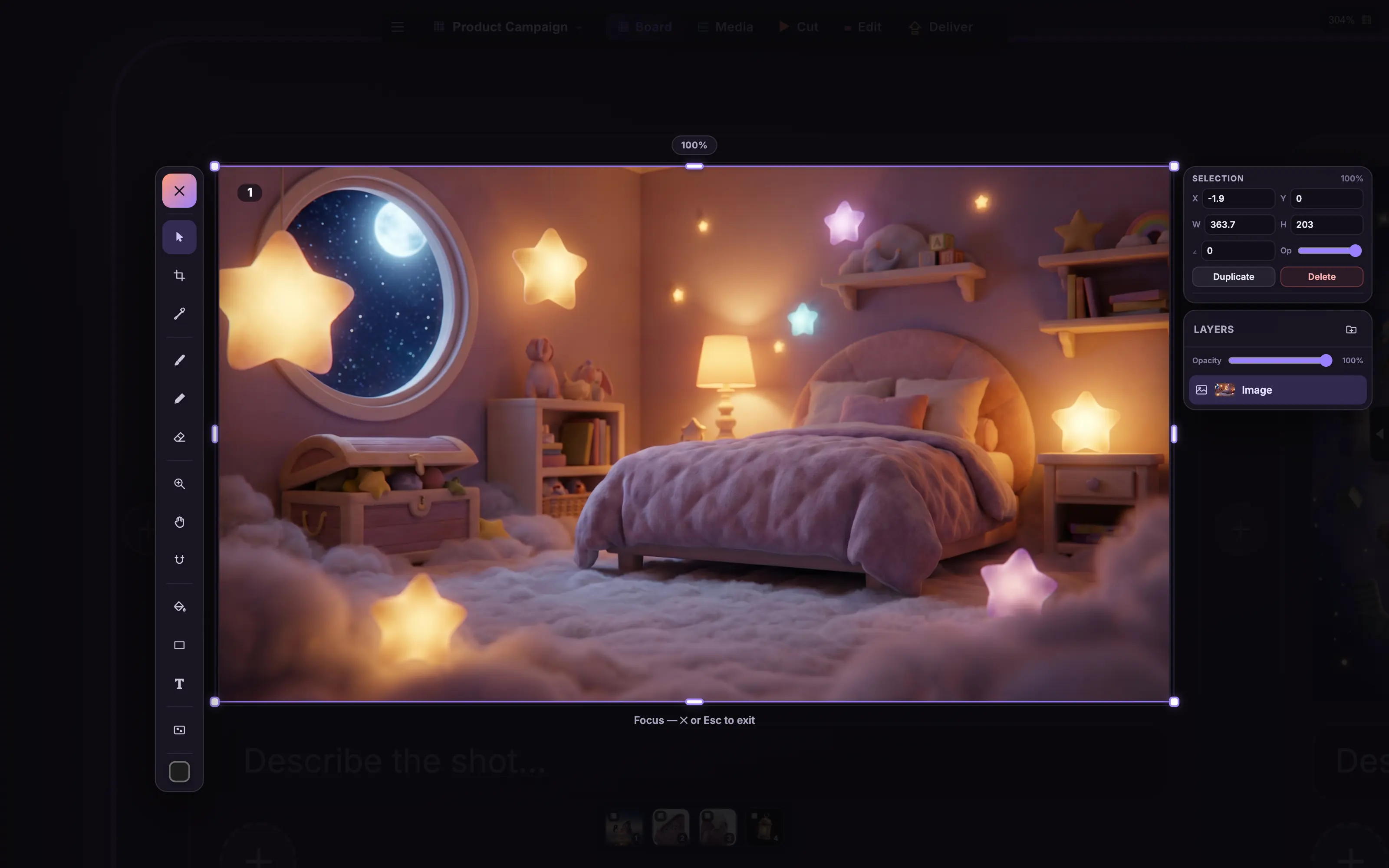
Double-click any frame and it opens like a Photoshop document. Crop, paint, mask, type, and layer, right where the shot lives. Draw on the frames themselves, with your own pencil or with AI.

7The Cut page

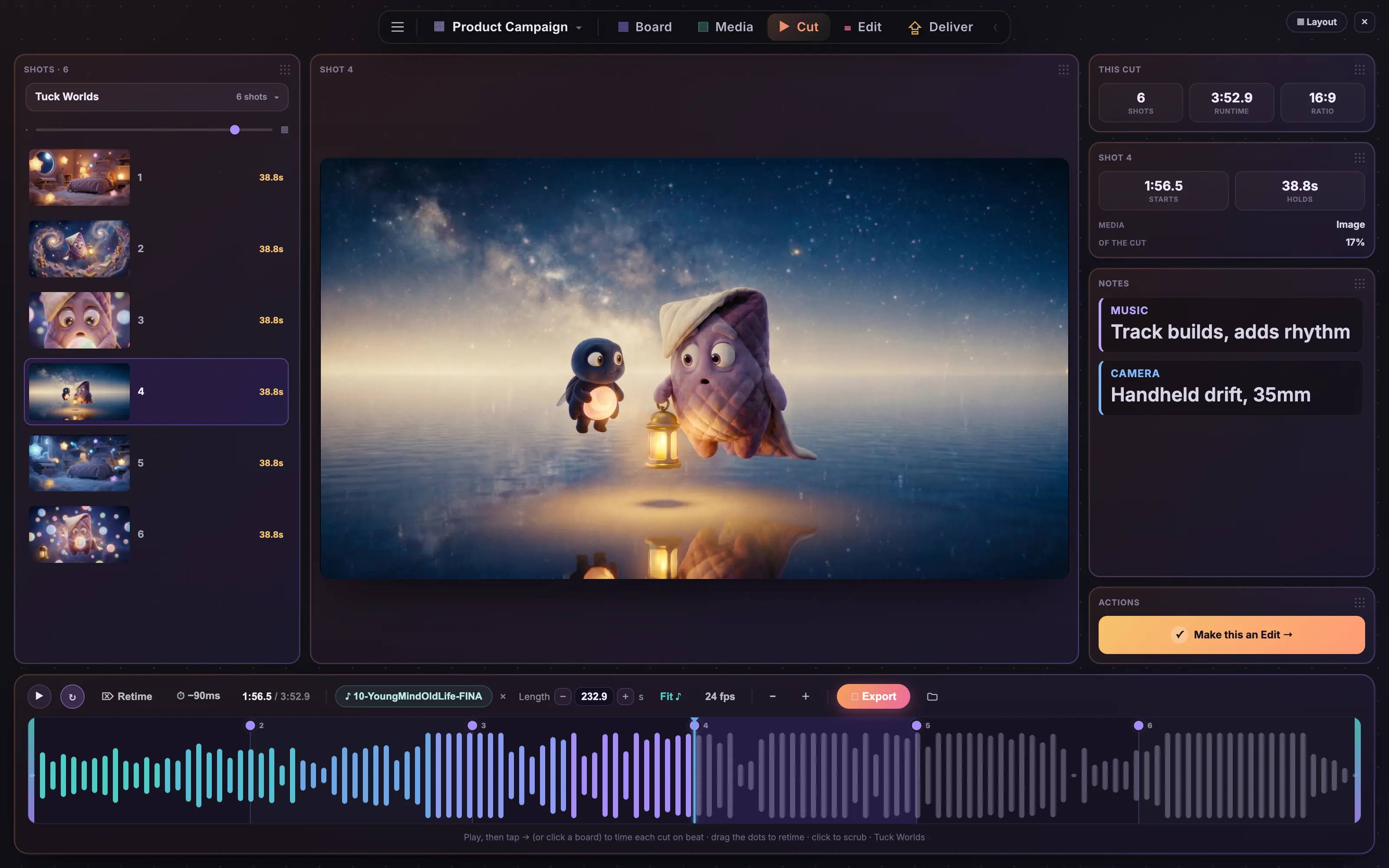
Play your boards like an edit. Retime cuts, scrub, lay in sound, and feel the animatic before anything is expensive.

8The Edit page

A real timeline for everything on the board: trim, split, and reorder your generations right next to your own footage and sound, on tracks, with a playhead, like it should be.

Boards · PDF
Animatic · MP4
Stills · ZIP
First cut · Premiere XML
Deliver

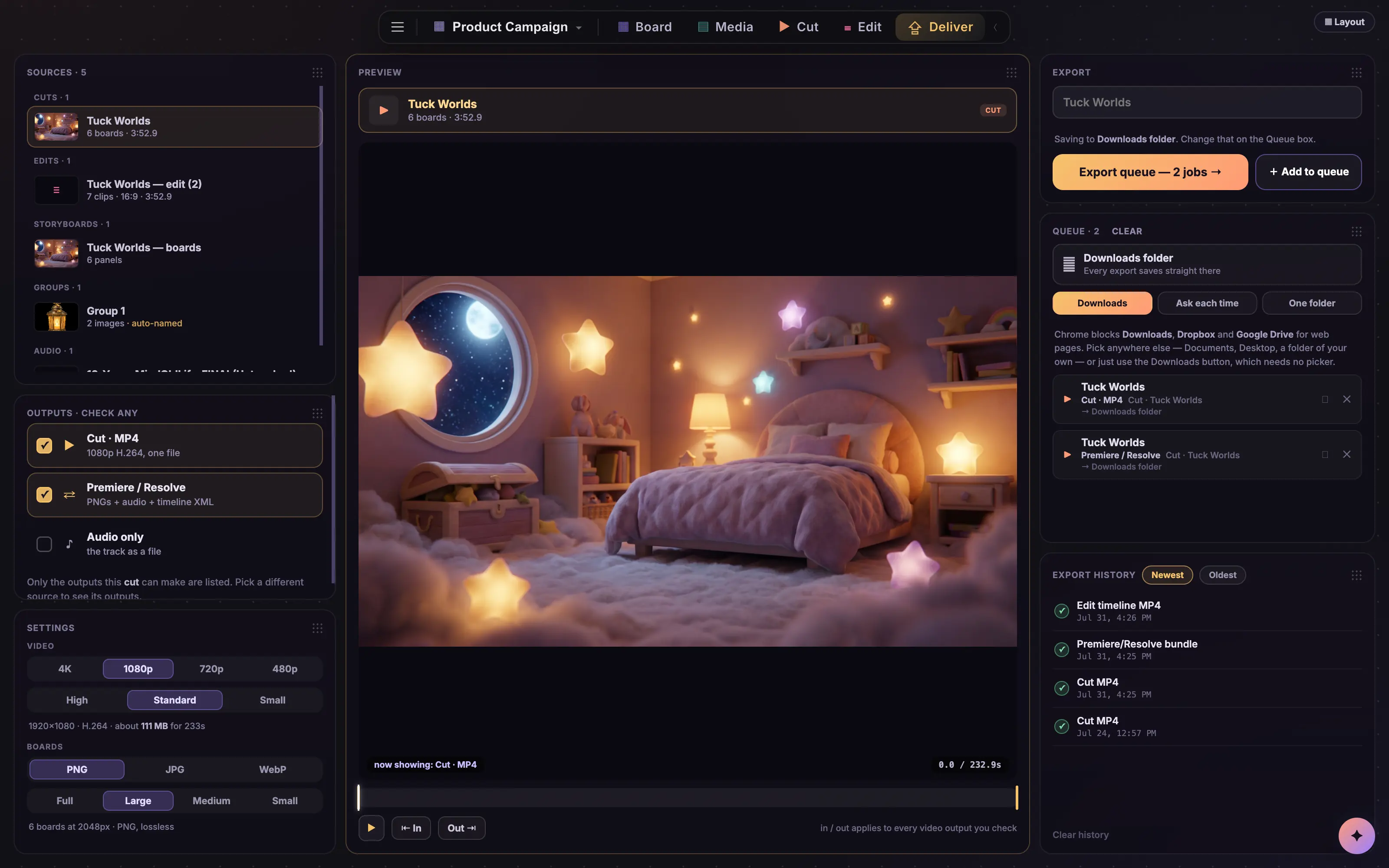
9The Deliver page

One page, every handoff: boards as PDFs, stills zipped, the animatic as an MP4, and a timeline Premiere or Resolve opens as a first cut. The job leaves the building the way the client needs it.

The real thing.

No mockups. These are straight captures from Coveboard, the same canvas you get on day one. Click any panel to open it full size.
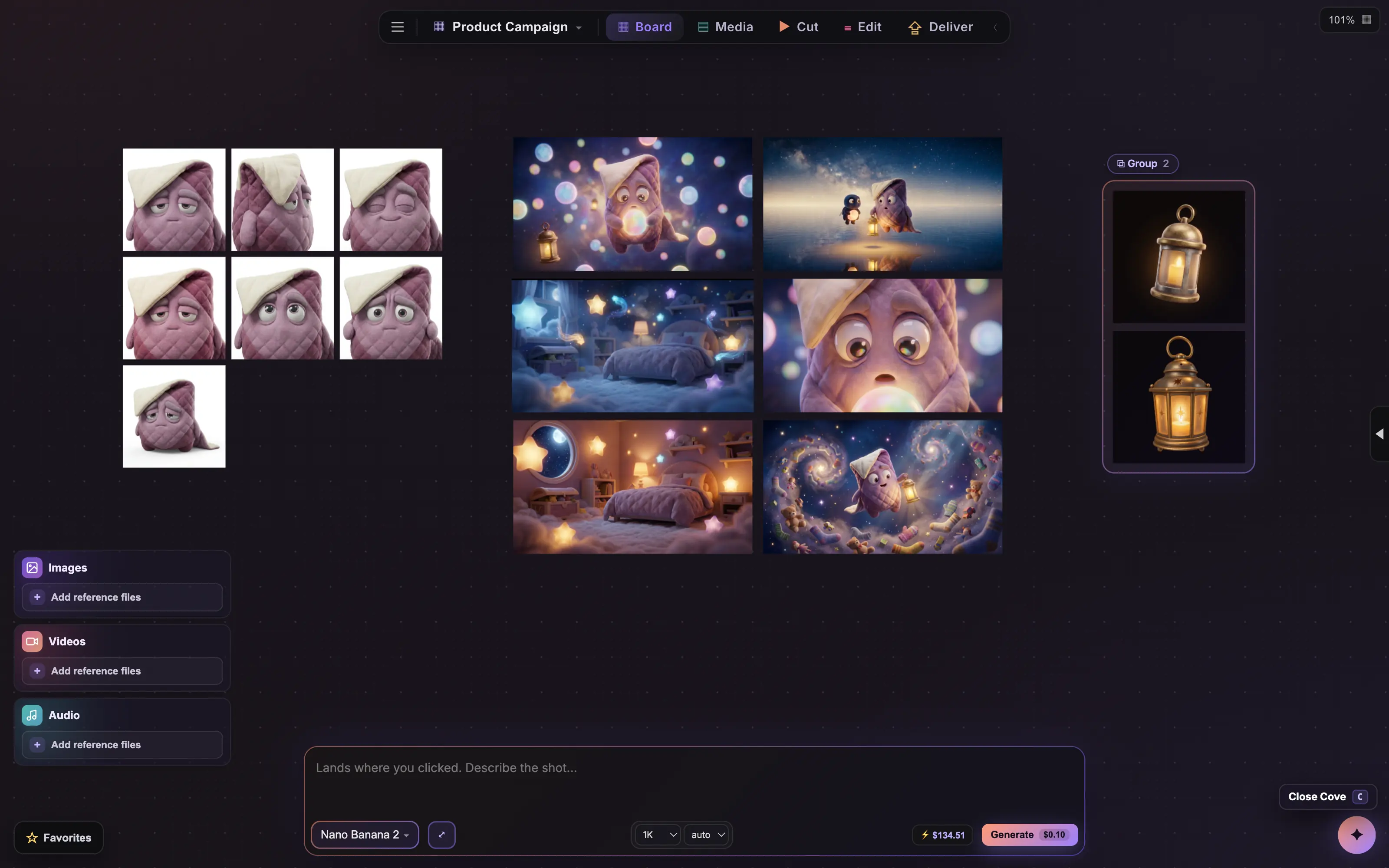
1 The Coveboard canvas with a character sheet, generated shots and grouped reference props
A board mid-session: character sheet, generated takes and grouped props side by side on one infinite canvas.
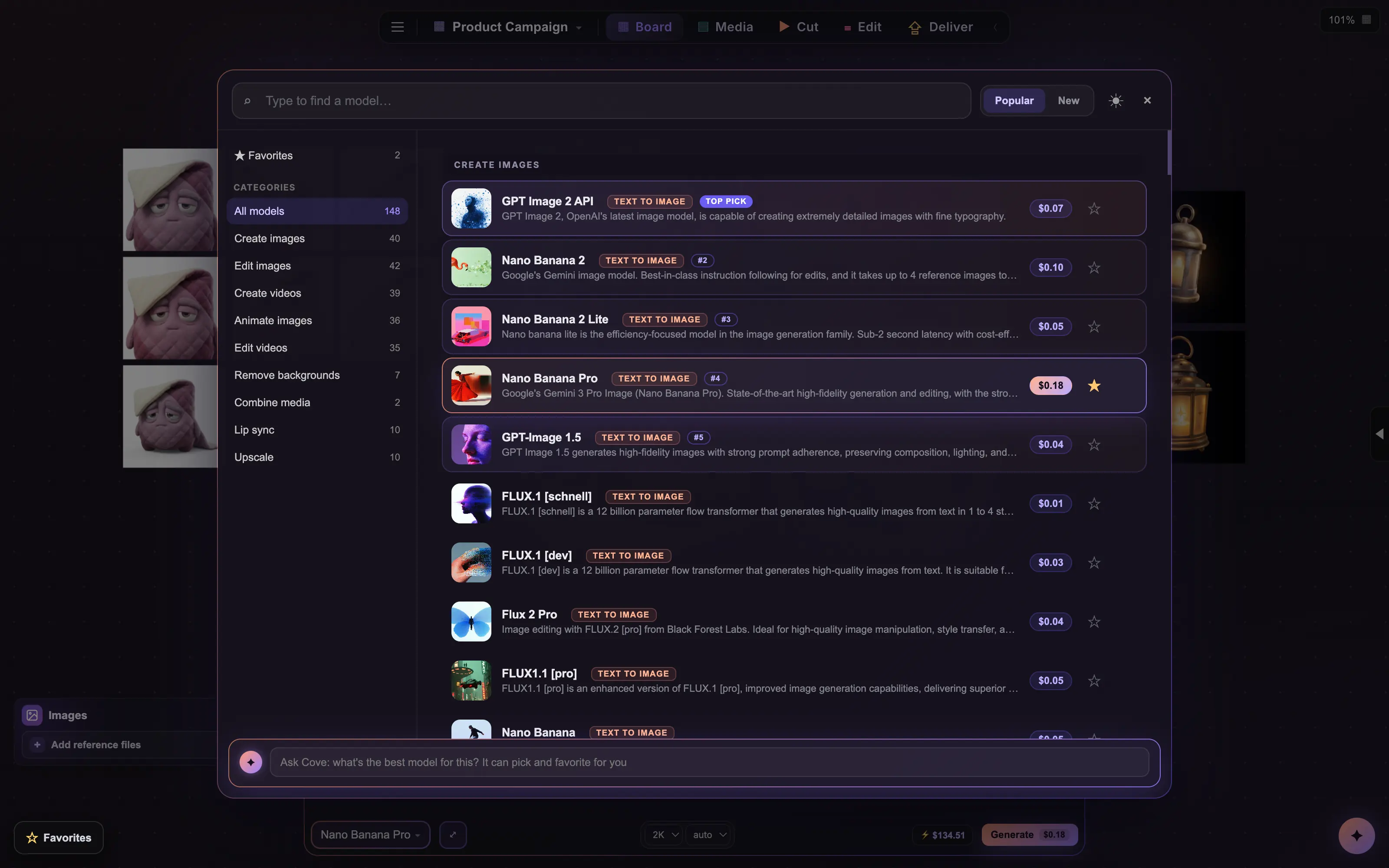
2 The Coveboard model browser listing models with live prices and rankings
170+ models sorted by what they do, with live prices and blind human-preference rankings. Ask Cove and it picks for you.
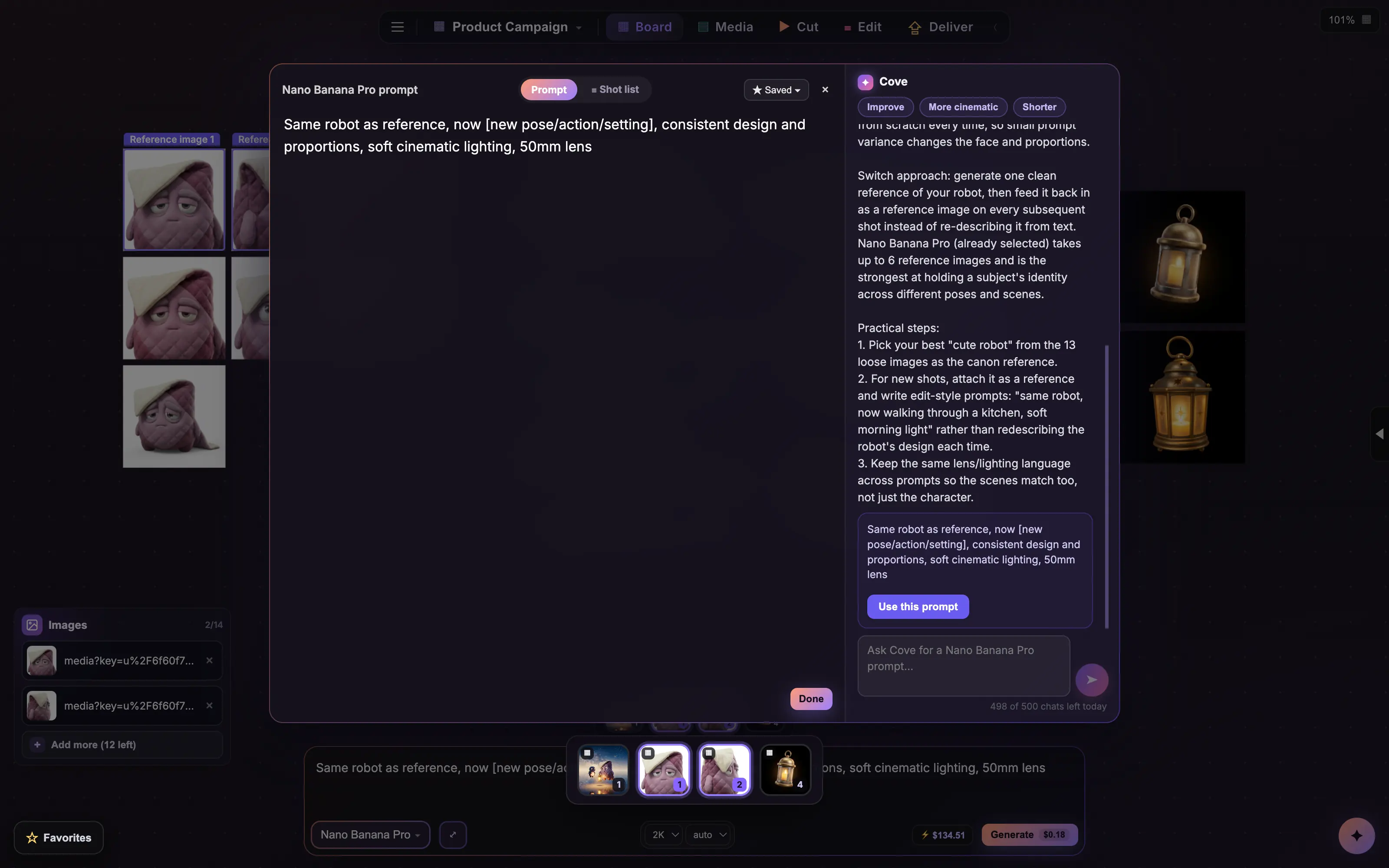
3 The enlarged prompt editor with Cove suggesting an improved prompt
The full prompt editor with Cove beside it. Tell it what is drifting and it hands back a better prompt, one tap to use.
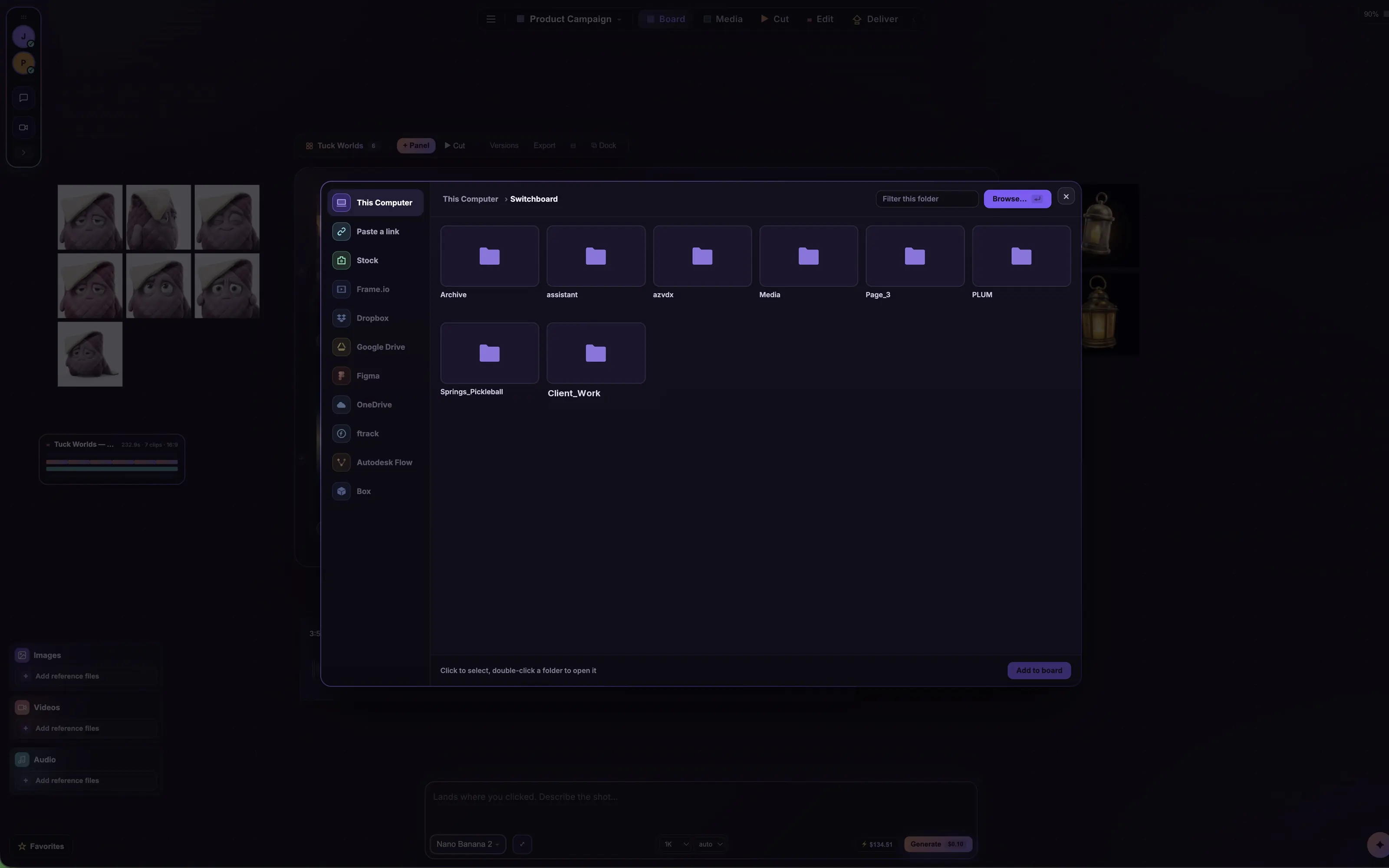
4 The Coveboard source browser with This Computer, Frame.io, Dropbox, Drive, Figma, ftrack and more
Double-click the canvas and every place your footage lives is one rail away, starting with this Mac.
1 A storyboard on the canvas with a live room and chat open
Numbered panels in their own board, with whoever else is in the room right there beside you.
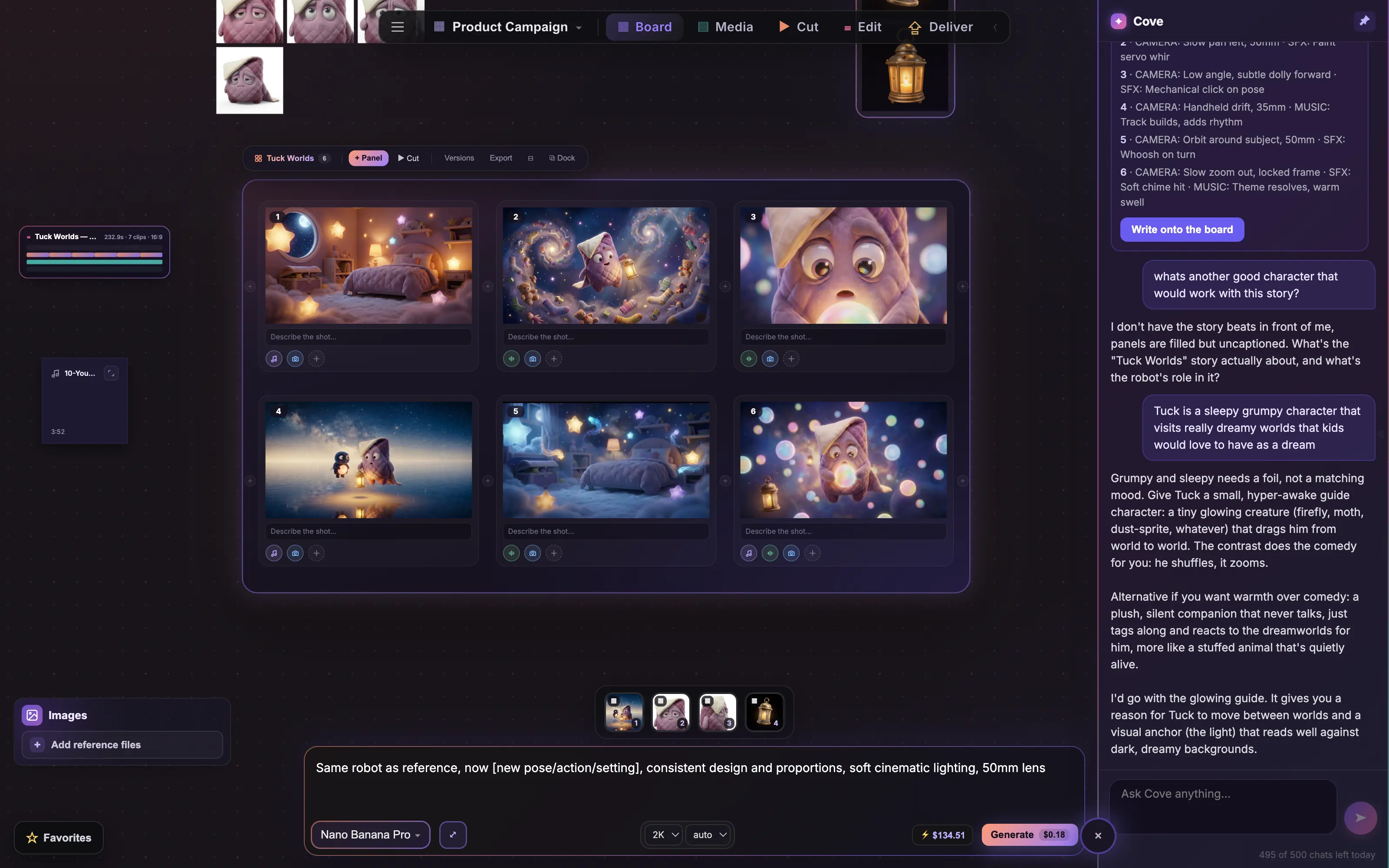
2 Cove docked beside the canvas, brainstorming characters for a storyboard
Cove sits beside the board and actually sees it. Ask who else belongs in the story and you get a real answer, not a menu.
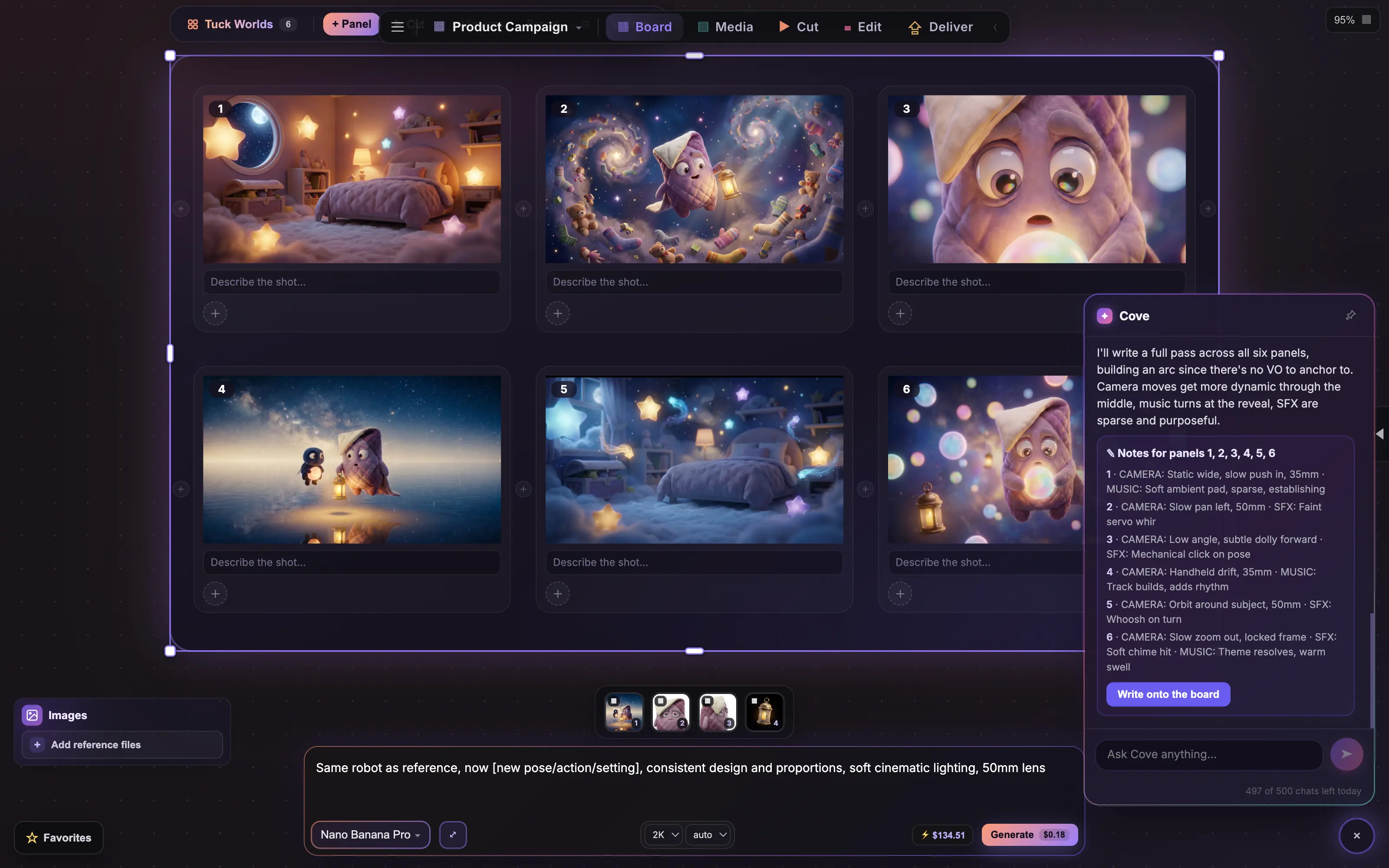
3 Cove writing camera, music and SFX notes across six storyboard panels
Ask for a pass across every panel and Cove writes the camera, music and SFX notes, then puts them on the board.
4 Focus mode: editing a storyboard panel with a tool strip and layers panel
Double-click a panel and paint, mask and retouch it like Photoshop, right where the shot lives.
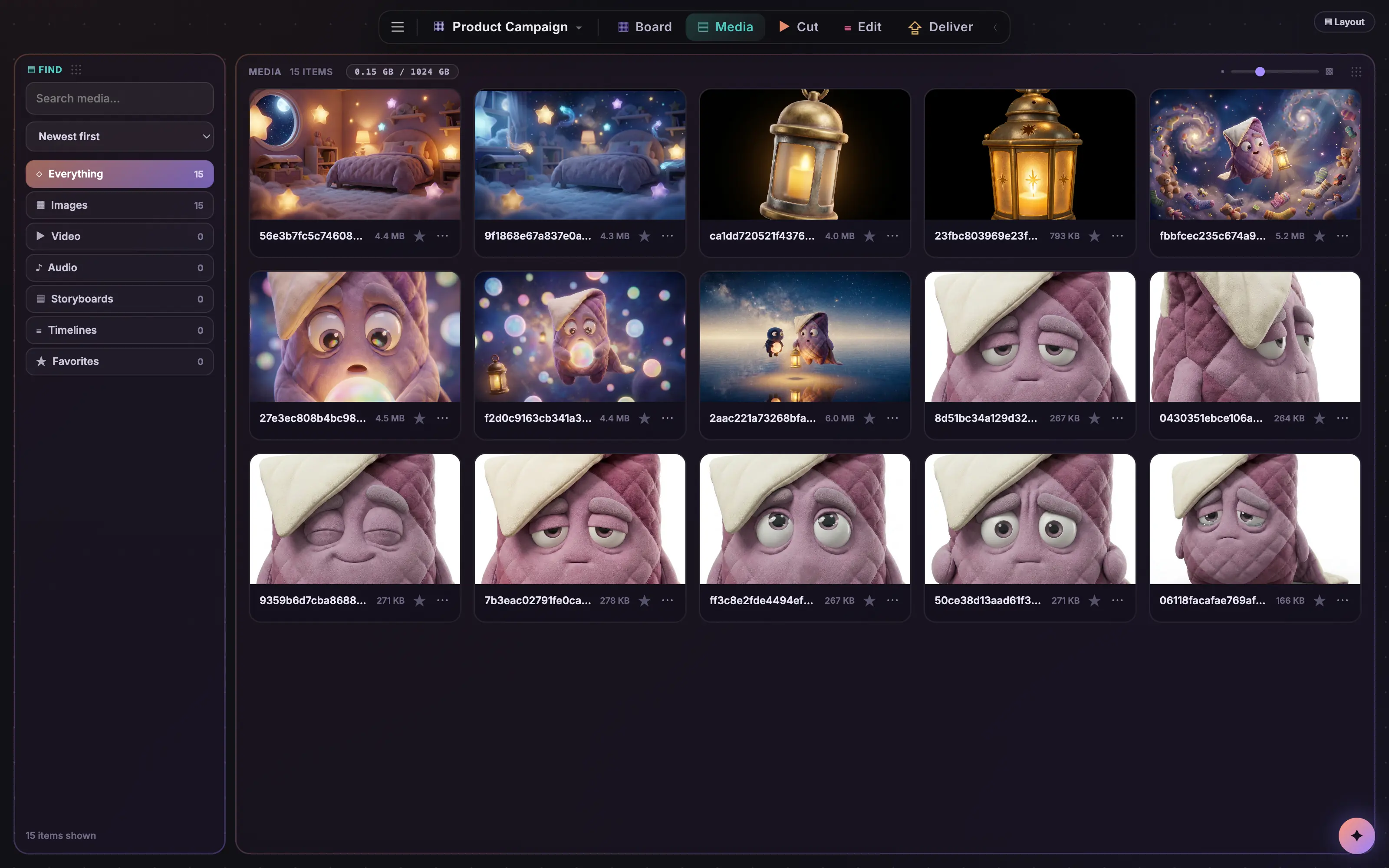
1 The Coveboard media browser listing every asset on the board
Every frame, clip and track this board has ever made, searchable and sortable in one place.
2 The Cut page with shot timings, notes and an audio waveform
Your boards as a cut: retime each shot to the beat, read the notes, and hear it against the track.
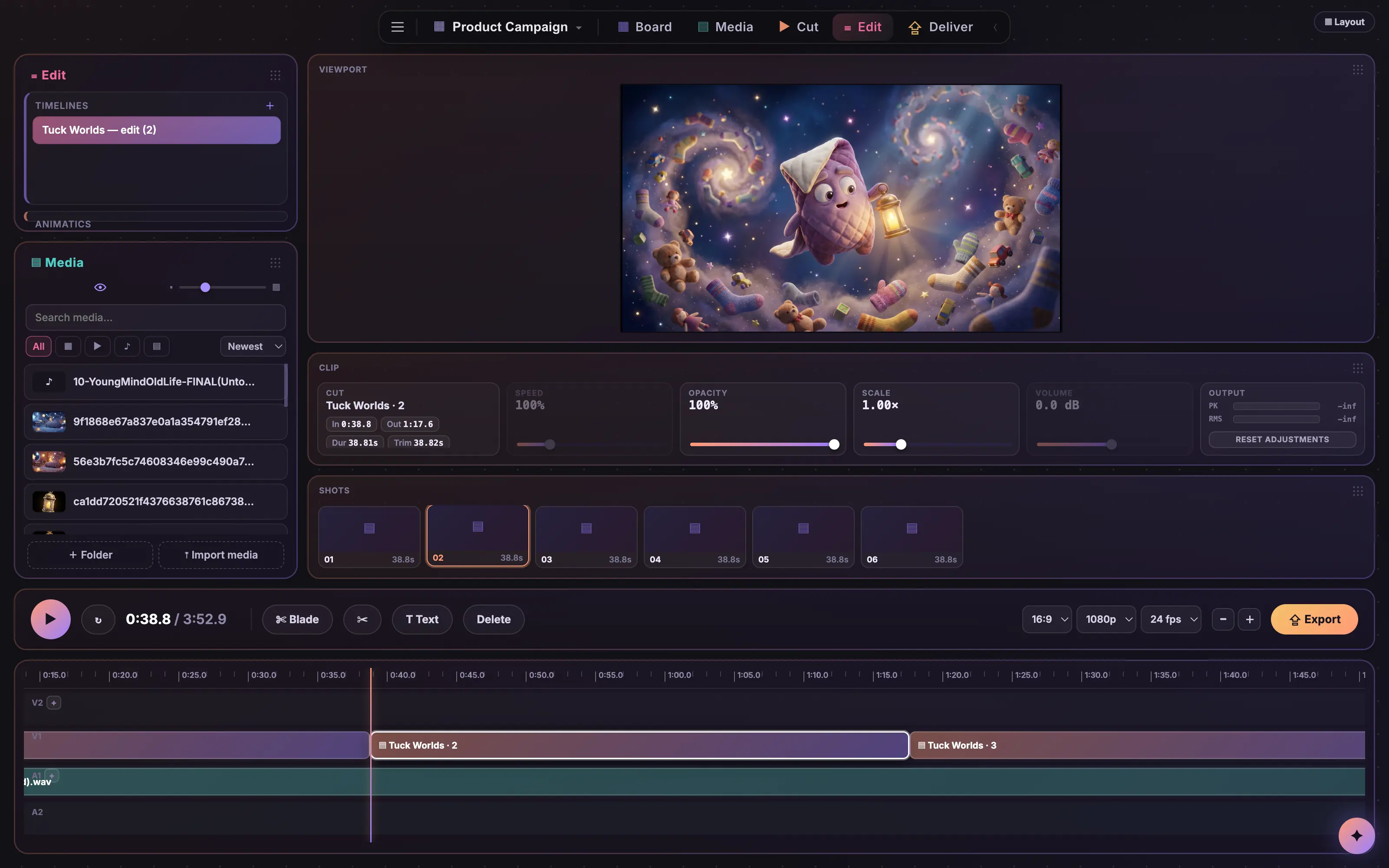
3 The Edit page with a multi-track timeline, viewport and clip inspector
A real timeline with tracks, clip controls and a viewport. Then export something Premiere or Resolve opens.
4 The Deliver page with sources, outputs and export settings
Pick a source, pick your outputs, set the settings. Queue it and every version lands in one go.

A canvas, not a queue.

Most AI tools hand you a chat log. On Coveboard every generation, clip, and sound lands as a real object on a real canvas. Work it the way you always have, with pencils, erasers, crops, and layers, or hand the same job to Cove and watch it happen. Every step goes both ways.

Switch models mid-thought

One prompt bar, over 170 models behind it. Jump from a Seedance clip to a Nano Banana still without losing your flow, with the live price on every Generate.

Compare side by side

Run the same prompt through three models at once. Smart grid snaps the results into clean rows so the winner is obvious.

Reference anything

Drop in a product shot or a frame you love. Use it as a start image, end frame, or style reference. Batch a prompt across every selected image.

Your media is welcome

Drag in your own footage and audio. Scrub video in place, see sound as waveforms, split clips frame by frame, and mix it all with generations on the same board.

One click to your other tools

Right-click a shot and send it straight into your open After Effects project, or pop it open in Photoshop. Every generation is a real file on your disk, so nothing needs an export dance.

Lives in your menu bar

Coveboard sits one click away in your Mac menu bar. Summon it from any app with ⌘⇧S, or set it to float above everything while you work in After Effects underneath.

AI woven into everything. Meet Cove.

Cove lives beside your canvas and actually sees it: your boards, your frames, your sound. Ask it to write the prompt, pick the right model, tidy the mess, or rough in a storyboard with you. Every step, moodboard to animatic. Included with every plan.

Writes your prompts

Tell it the shot in your head and it writes the prompt tuned to your selected model, with a one-tap Use button. Failed generation? It reads the error and hands you a fixed prompt.

Knows every model

Ask what's best for lipsync, product shots, or anime. Cove answers from live human-preference rankings and real prices, quotes any idea in exact dollars before you spend, and can pick the model for you.

👁

Sees your board

Cove looks at your images, video frames, and audio and gives real opinions. It writes shot notes onto storyboard panels and organizes the canvas into grids and groups on command.

Plans it, runs it, remembers

Ask for four takes on an idea and one click runs the whole batch and grids the results. Cove remembers what each board is about and how you like your shots.

Simple plans. Real dollars.

Every plan is the full studio: unlimited boards, storyboards, animatics, and editor exports, plus a monthly budget of generations in plain dollars, shown on the Generate button before you commit. No credits, no tokens, no conversion math. Every plan starts with a 7-day free trial, and the people you share with never pay to look: viewers are free and unlimited on every plan.

Solo

$19/month
The whole studio, for one person
  • The whole suite: canvas, storyboards, Cut, Edit, and Deliver
  • Unlimited boards, unlimited viewers on every share link
  • 250 GB of storage for your shots and renders
  • All 170+ models · Cove included, 75 chats/day
  • $6 of generations every month; top up anytime, and top-ups never expire
MOST POPULAR

Pro

$49/month
The whole studio, plus room for clients
Everything in Solo, plus
  • 1 TB of storage: client videos, every version, all of it
  • $20 of generations every month
  • Member pricing: a standing discount on the popular models, the ones people actually generate with
  • Cove steps up to 200 chats/day

Team

$149/month
One shared studio, three editors
Everything in Pro, plus
  • One shared studio: team boards everyone just opens
  • 3 TB of pooled storage that belongs to the team, not to any one account
  • $50 of pooled generations every month, from one team balance with a spend log
  • Extra editor seats $39/month, each adding storage and budget

Your next idea starts here.

Download free. Board an idea this week. Keep it if it earns a place in your work.

macOS 12+ (Apple Silicon) · Windows 10+ (64-bit)